
OpenClaw Docker Deployment and DingTalk Bot Integration
1. Docker Installation
- Install Docker Desktop for Windows and Mac
https://docs.docker.com/desktop/setup/install/windows-install/
- Install Docker Engine for Linux
https://docs.docker.com/engine/install/ubuntu/
2. Deploy OpenClaw CN Docker
- Create working directory
mkdir -p ~/openclaw-docker
cd ~/openclaw-docker- Create
.envenvironment file
cat > .env << 'EOF'
OPENCLAW_IMAGE=jiulingyun803/openclaw-cn:latest
OPENCLAW_CONFIG_DIR=./data/.openclaw
OPENCLAW_WORKSPACE_DIR=./data/clawd
OPENCLAW_GATEWAY_PORT=18789
OPENCLAW_BRIDGE_PORT=18790
OPENCLAW_GATEWAY_BIND=lan
OPENCLAW_GATEWAY_TOKEN=
CLAUDE_AI_SESSION_KEY=
CLAUDE_WEB_SESSION_KEY=
CLAUDE_WEB_COOKIE=
EOF- Create
docker-compose.ymlfile
services:
  openclaw-cn-gateway:
    image: ${OPENCLAW_IMAGE:-openclaw-cn:local}
    user: node:node
    environment:
      HOME: /home/node
      TERM: xterm-256color
      OPENCLAW_GATEWAY_TOKEN: ${OPENCLAW_GATEWAY_TOKEN}
      CLAUDE_AI_SESSION_KEY: ${CLAUDE_AI_SESSION_KEY}
      CLAUDE_WEB_SESSION_KEY: ${CLAUDE_WEB_SESSION_KEY}
      CLAUDE_WEB_COOKIE: ${CLAUDE_WEB_COOKIE}
    volumes:
      - ${OPENCLAW_CONFIG_DIR:-./data/.openclaw}:/home/node/.openclaw
      - ${OPENCLAW_WORKSPACE_DIR:-./data/clawd}:/home/node/clawd
    ports:
      - "${OPENCLAW_GATEWAY_PORT:-18789}:18789"
      - "${OPENCLAW_BRIDGE_PORT:-18790}:18790"
    init: true
    restart: unless-stopped
    command:
      [
        "node",
        "dist/index.js",
        "gateway",
        "--bind",
        "lan",
        "--port",
        "${OPENCLAW_GATEWAY_PORT:-18789}",
      ]

  openclaw-cn-cli:
    image: ${OPENCLAW_IMAGE:-openclaw-cn:local}
    user: node:node
    environment:
      HOME: /home/node
      TERM: xterm-256color
      BROWSER: echo
      CLAUDE_AI_SESSION_KEY: ${CLAUDE_AI_SESSION_KEY}
      CLAUDE_WEB_SESSION_KEY: ${CLAUDE_WEB_SESSION_KEY}
      CLAUDE_WEB_COOKIE: ${CLAUDE_WEB_COOKIE}
    volumes:
      - ${OPENCLAW_CONFIG_DIR:-./data/.openclaw}:/home/node/.openclaw
      - ${OPENCLAW_WORKSPACE_DIR:-./data/clawd}:/home/node/clawd
    stdin_open: true
    tty: true
    init: true
entrypoint: ["node", "dist/index.js"]- Start containers
# Pull the latest image
docker compose pull

# Start gateway (run in background)
docker compose up -d openclaw-cn-gateway

# View logs (optional)
docker compose logs -f openclaw-cn-gateway- Run configuration wizard
docker compose run --rm openclaw-cn-cli onboardConfiguration example:
◇  I understand this is powerful and inherently risky. Continue? → Yes
◇  Onboarding mode → Manual
◇  What do you want to set up? → Local gateway (this machine)
◇  Workspace directory → /home/node/.openclaw/workspace (default)
◇  Model/auth provider → Skip for now (can configure Alibaba Cloud Bailian or other models later)
◇  Filter models by provider → All providers
◇  Default model → Keep current (default)
◇  Gateway port → 18789 (default, consistent with Nginx configuration)
◇  Gateway bind → LAN (0.0.0.0) (allow LAN access)
◇  Gateway auth → Password (set login password)
◇  Tailscale exposure → Off
◇  Gateway password → Enter custom password (required for future login)
◇  Configure chat channels now? → No
◇  Configure skills now? → No
◇ Enable hooks? → Skip for now (select with space and press Enter)- Access Web UI
http://localhost:18789/If the server doesn't have a GUI, use SSH port forwarding and access locally: http://localhost:18789/
ssh -N -f -L 18789:127.0.0.1:18789 <user>@<host>Reference documentation: https://clawd.org.cn/install/docker-quick.html
3. Configure DingTalk Bot
Install DingTalk Plugin
Enter container to install plugin
sudo docker ps
docker exec -it <container-id> /bin/bash

npm config set registry https://registry.npmmirror.com/ # Configure npm Taobao mirror to resolve installation failures

openclaw-cn plugins install @moltybob/dingtalk

cd ~/.openclaw/extensions/dingtalk && npm install --omit=dev --ignore-scripts # If dependencies fail during installation, install manually

openclaw-cn plugins list | grep dingtalk # Verify plugin loading
Common Issues:
openclaw-cn not found
Usefind / -name "*openclaw-cn*" 2>/dev/nullto locate, then add to environment variableexport PATH="<openclaw-cn location>:$PATH"npm plugin dependency installation failednpm config set registry https://registry.npmmirror.com/
DingTalk Open Platform Configuration
- Create application
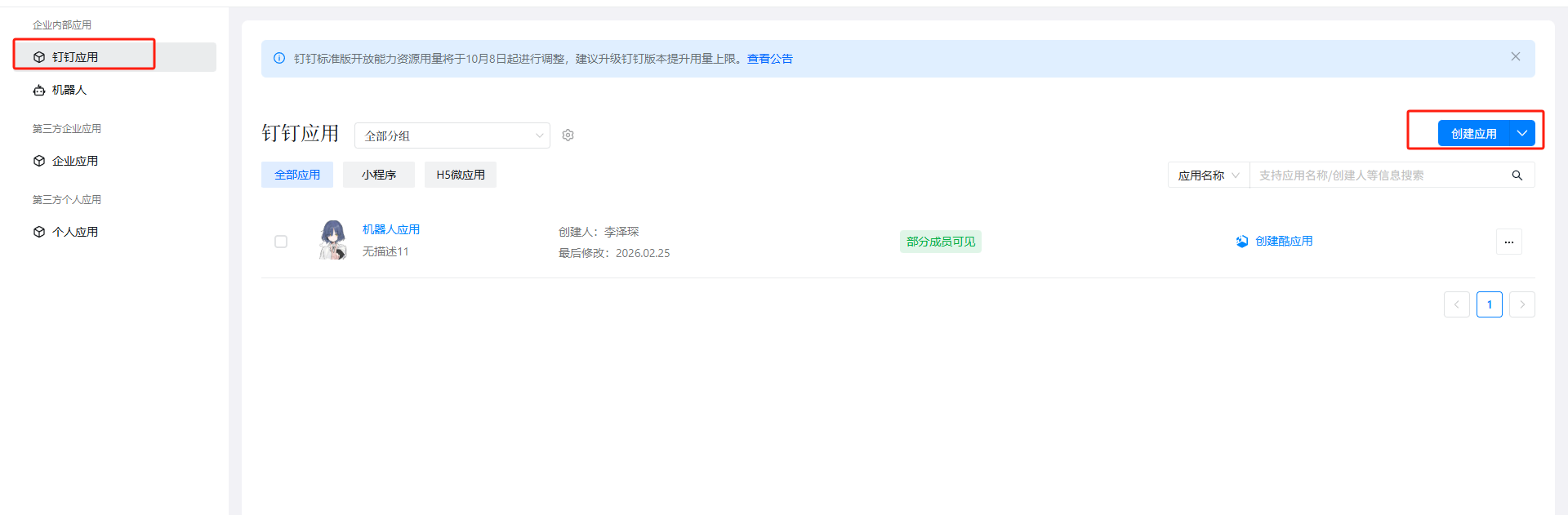
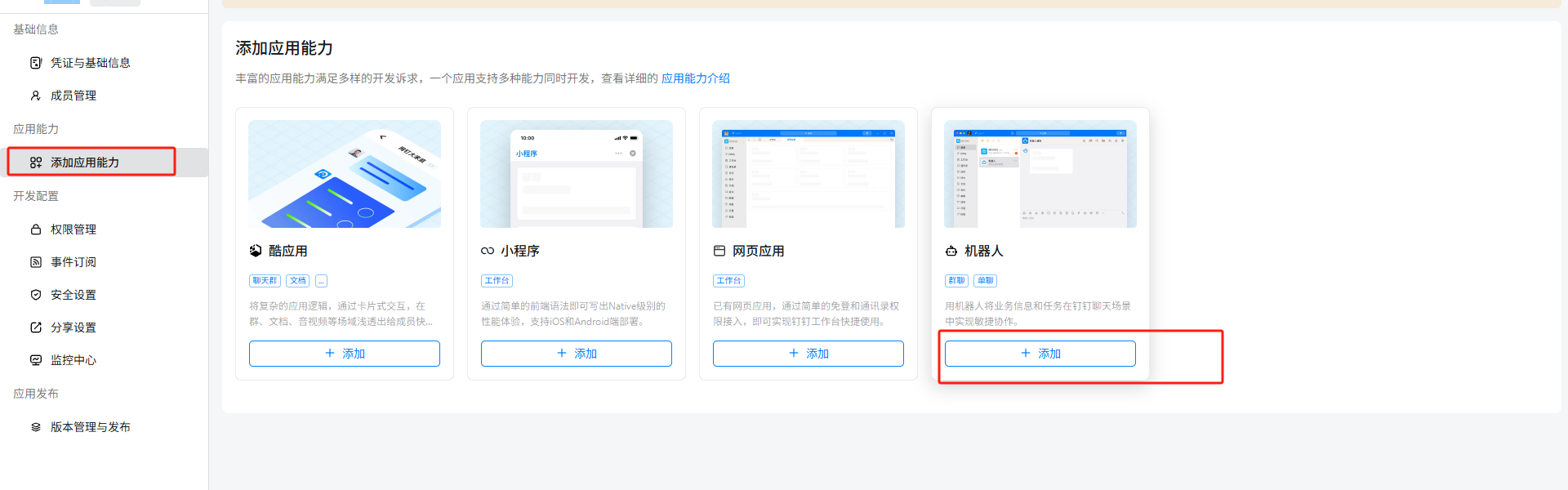
- Add robot capabilities
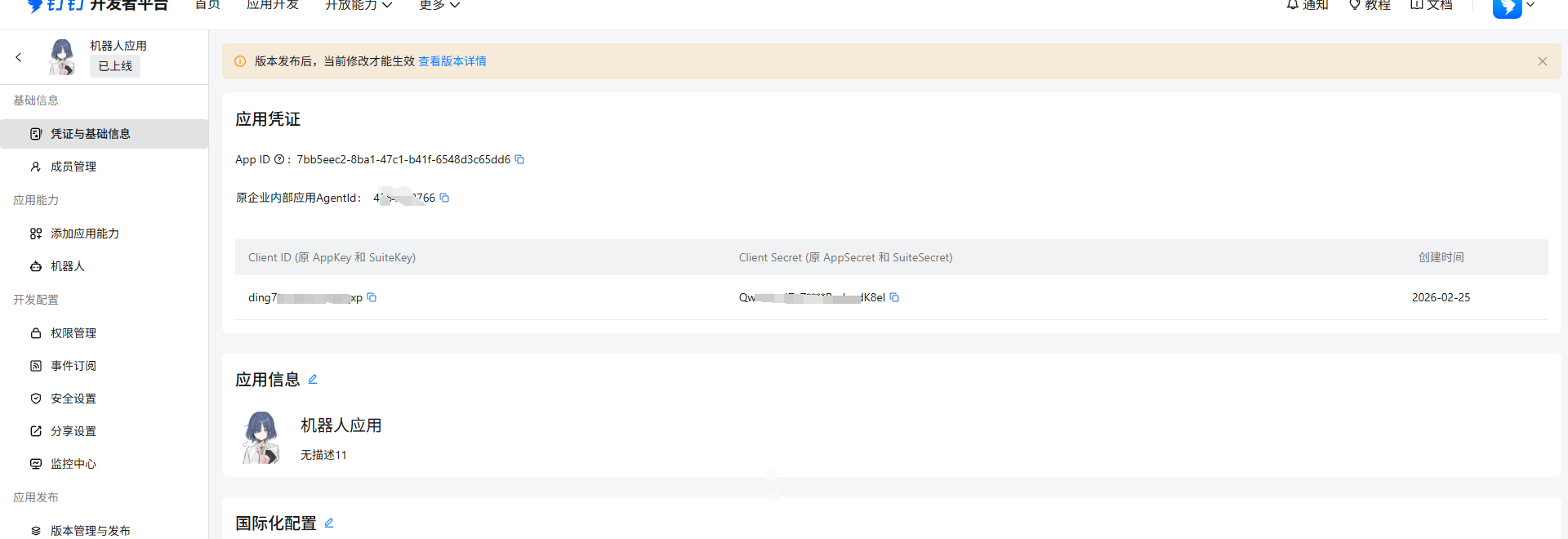
- Obtain credentials
- Publish application
Configure DingTalk Credentials
Edit configuration file ~/.openclaw/openclaw.json, add
  "channels": {
    "dingtalk": {
      "enabled": true,
      "clientId": "<Client ID (original AppKey and Suitekey)>",
      "clientSecret": "<Client Secret (original AppSecret and SuiteSecret)>",
      "robotCode": "<robotCode>",
      "corpId": "<corpId>",
      "agentId": "<original enterprise internal application Agentid>",
      "dmPolicy": "open"
    }
  },
Common Issues:
- Control panel returns
{"success":true}instead of page:
Edit ~/.openclaw/extensions/dingtalk/src/monitor.ts, find the beginning of handleDingTalkWebhookRequest function, change to:
export async function handleDingTalkWebhookRequest(
  req: import('node:http').IncomingMessage,
  res: import('node:http').ServerResponse
): Promise<boolean> {
  // Only handle POST requests to dingtalk webhook paths
  const url = req.url || '';
  const isDingTalkPath = url.includes('/dingtalk') || url.includes('/webhook');

  if (req.method !== 'POST' || !isDingTalkPath) {
    return false; // Let other handlers process non-dingtalk requests
  }

  console.log(`[dingtalk] HTTP request received: ${req.method} ${req.url}`);
// ... rest of the code unchanged- Error code
1008:
Modify ~/.openclaw/devices/pending.json file, silent:true
4. Feishu Configuration
Reference official documentation: https://clawd.org.cn/channels/feishu.html
AI Translation Notice
English: This article has been translated from Chinese to English using AI-assisted translation tools. While efforts have been made to ensure accuracy, some nuances may differ from the original. If you notice any errors or have suggestions for improvement, please feel free to provide feedback.
中文: 本文使用AI辅助翻译工具从中文翻译为英文。尽管已尽力确保准确性,但某些细微差别可能与原文有所不同。如果您发现任何错误或有改进建议,请随时提供反馈。
Translated on: 2026-02-25