
OpenClaw docker 部署并接入钉钉机器人
2026/2/25大约 3 分钟
一、安装Docker
- Windows和Mac安装 Docker Desktop
https://docs.docker.com/desktop/setup/install/windows-install/
- Linux安装Docker Engine
https://docs.docker.com/engine/install/ubuntu/
二、部署OpenClaw CN Docker
- 创建工作目录
mkdir -p ~/openclaw-docker
cd ~/openclaw-docker- 创建
.env环境文件
cat > .env << 'EOF'
OPENCLAW_IMAGE=jiulingyun803/openclaw-cn:latest
OPENCLAW_CONFIG_DIR=./data/.openclaw
OPENCLAW_WORKSPACE_DIR=./data/clawd
OPENCLAW_GATEWAY_PORT=18789
OPENCLAW_BRIDGE_PORT=18790
OPENCLAW_GATEWAY_BIND=lan
OPENCLAW_GATEWAY_TOKEN=
CLAUDE_AI_SESSION_KEY=
CLAUDE_WEB_SESSION_KEY=
CLAUDE_WEB_COOKIE=
EOF- 创建
docker-compose.yml文件
services:
  openclaw-cn-gateway:
    image: ${OPENCLAW_IMAGE:-openclaw-cn:local}
    user: node:node
    environment:
      HOME: /home/node
      TERM: xterm-256color
      OPENCLAW_GATEWAY_TOKEN: ${OPENCLAW_GATEWAY_TOKEN}
      CLAUDE_AI_SESSION_KEY: ${CLAUDE_AI_SESSION_KEY}
      CLAUDE_WEB_SESSION_KEY: ${CLAUDE_WEB_SESSION_KEY}
      CLAUDE_WEB_COOKIE: ${CLAUDE_WEB_COOKIE}
    volumes:
      - ${OPENCLAW_CONFIG_DIR:-./data/.openclaw}:/home/node/.openclaw
      - ${OPENCLAW_WORKSPACE_DIR:-./data/clawd}:/home/node/clawd
    ports:
      - "${OPENCLAW_GATEWAY_PORT:-18789}:18789"
      - "${OPENCLAW_BRIDGE_PORT:-18790}:18790"
    init: true
    restart: unless-stopped
    command:
      [
        "node",
        "dist/index.js",
        "gateway",
        "--bind",
        "lan",
        "--port",
        "${OPENCLAW_GATEWAY_PORT:-18789}",
      ]

  openclaw-cn-cli:
    image: ${OPENCLAW_IMAGE:-openclaw-cn:local}
    user: node:node
    environment:
      HOME: /home/node
      TERM: xterm-256color
      BROWSER: echo
      CLAUDE_AI_SESSION_KEY: ${CLAUDE_AI_SESSION_KEY}
      CLAUDE_WEB_SESSION_KEY: ${CLAUDE_WEB_SESSION_KEY}
      CLAUDE_WEB_COOKIE: ${CLAUDE_WEB_COOKIE}
    volumes:
      - ${OPENCLAW_CONFIG_DIR:-./data/.openclaw}:/home/node/.openclaw
      - ${OPENCLAW_WORKSPACE_DIR:-./data/clawd}:/home/node/clawd
    stdin_open: true
    tty: true
    init: true
entrypoint: ["node", "dist/index.js"]- 启动容器
# 拉取最新镜像
docker compose pull

# 启动网关(后台运行)
docker compose up -d openclaw-cn-gateway

# 查看日志(可选)
docker compose logs -f openclaw-cn-gateway- 运行配置向导
docker compose run --rm openclaw-cn-cli onboard配置示例:
◇  I understand this is powerful and inherently risky. Continue? → Yes
◇  Onboarding mode → Manual
◇  What do you want to set up? → Local gateway (this machine)
◇  Workspace directory → /home/node/.openclaw/workspace(默认)
◇  Model/auth provider → Skip for now(后续可配置阿里云百炼等模型)
◇  Filter models by provider → All providers
◇  Default model → Keep current(默认)
◇  Gateway port → 18789(默认,与Nginx配置一致)
◇  Gateway bind → LAN (0.0.0.0)(允许局域网访问)
◇  Gateway auth → Password(设置登录密码)
◇  Tailscale exposure → Off
◇  Gateway password → 输入自定义密码(后续登录需使用)
◇  Configure chat channels now? → No
◇  Configure skills now? → No
◇ Enable hooks? → Skip for now(空格选择后回车)- 访问 Web UI
http://localhost:18789/若服务器没有GUI,用SSH做一下端口转发,然后在本地访问: http://localhost:18789/
ssh -N -f -L 18789:127.0.0.1:18789 <user>@<host>参考文档地址:https://clawd.org.cn/install/docker-quick.html
三、配置钉钉机器人
安装DingTalk插件
进入容器安装插件
sudo docker ps
docker exec -it <容器id> /bin/bash

npm config set registry https://registry.npmmirror.com/ # 配置npm的淘宝镜像 解决安装失败的问题

openclaw-cn plugins install @moltybob/dingtalk

cd ~/.openclaw/extensions/dingtalk && npm install --omit=dev --ignore-scripts # 如果安装时依赖报错,手动装依赖

openclaw-cn plugins list | grep dingtalk # 验证插件加载
常见问题:
openclaw-cn not found
使用find / -name "*openclaw-cn*" 2>/dev/null查找 ,然后添加进环境变量export PATH="<openclaw-cn所在位置>:$PATH"npm 安装插件依赖失败npm config set registry https://registry.npmmirror.com/
钉钉开放平台配置
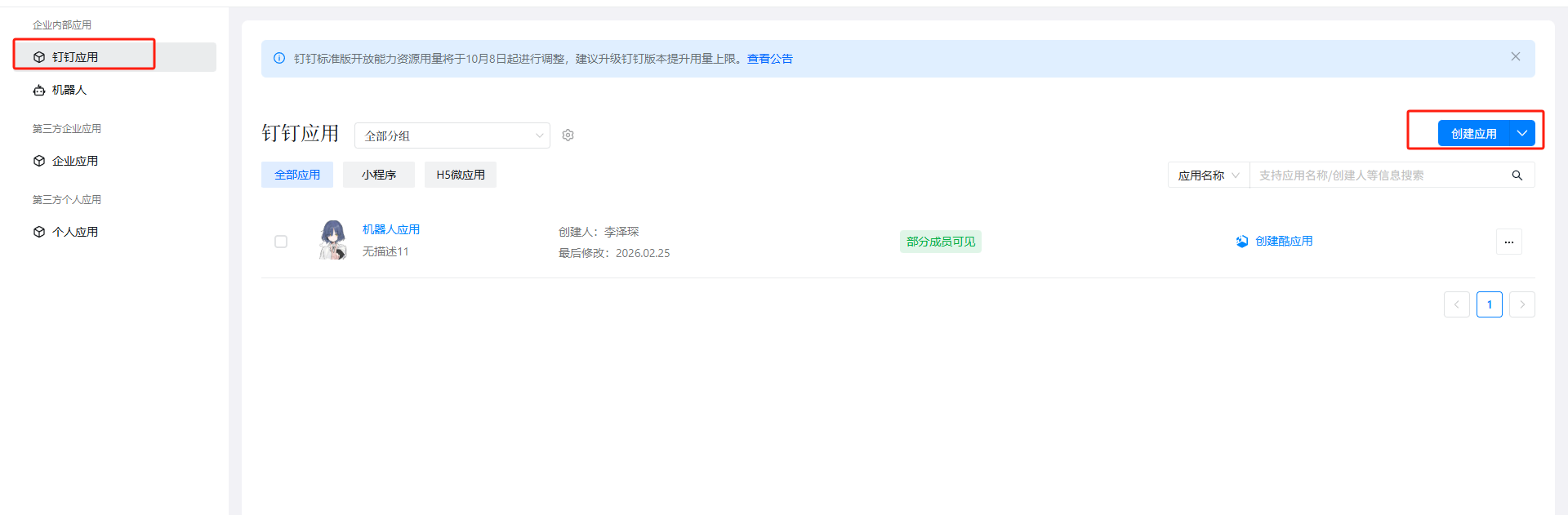
- 创建应用
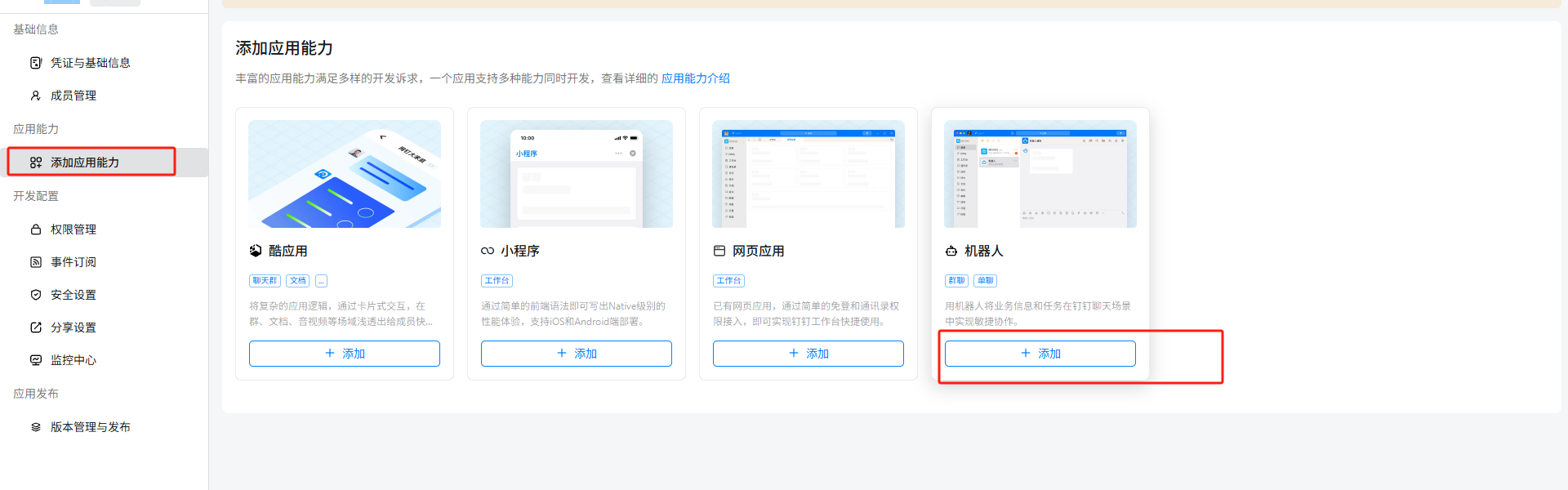
- 添加机器人能力
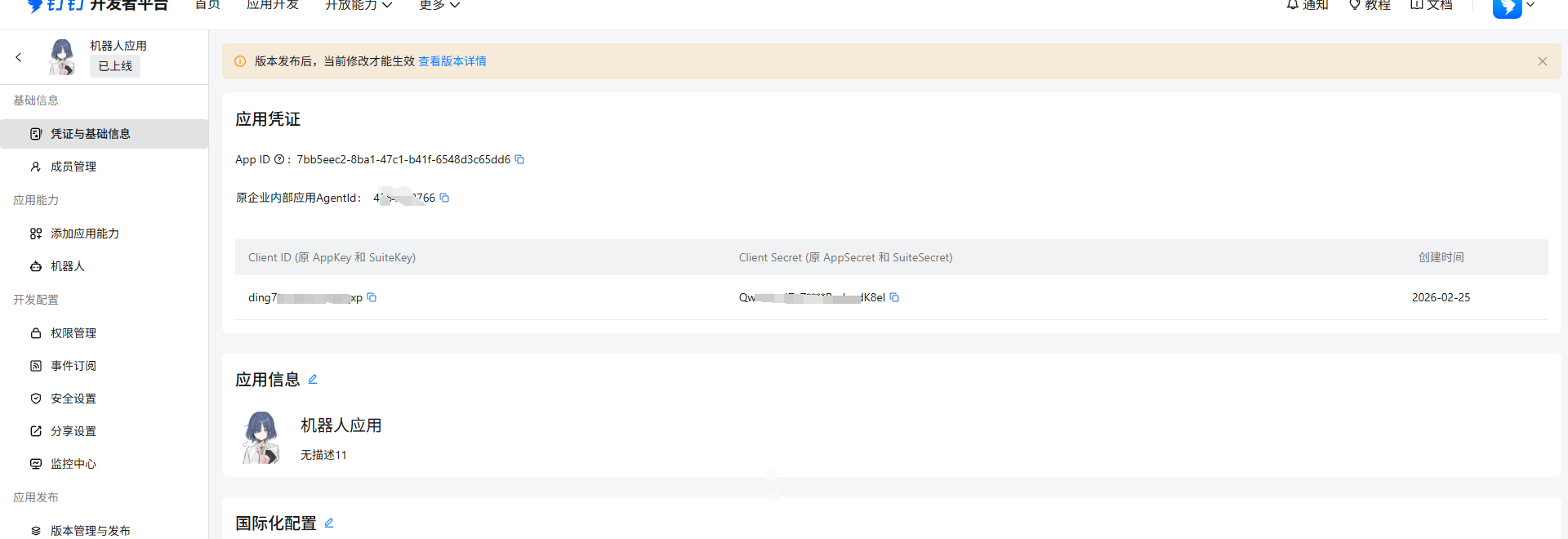
- 获取凭证
- 发布应用
配置钉钉凭证
编辑配置文件 ~/.openclaw/openclaw.json,添加
  "channels": {
    "dingtalk": {
      "enabled": true,
      "clientId": "<Client ID (原 AppKey 和 Suitekey)>",
      "clientSecret": "<Client Secret (原 AppSecret 和 SuiteSecret)>",
      "robotCode": "<robotCode>",
      "corpId": "<corpId>",
      "agentId": "<原企业内部应用Agentid>",
      "dmPolicy": "open"
    }
  },
常见问题:
- 控制面板返回
{"success":true}而非页面:
编辑 ~/.openclaw/extensions/dingtalk/src/monitor.ts 找到 handleDingTalkWebhookRequest 函数开头,改成:
export async function handleDingTalkWebhookRequest(
  req: import('node:http').IncomingMessage,
  res: import('node:http').ServerResponse
): Promise<boolean> {
  // Only handle POST requests to dingtalk webhook paths
  const url = req.url || '';
  const isDingTalkPath = url.includes('/dingtalk') || url.includes('/webhook');

  if (req.method !== 'POST' || !isDingTalkPath) {
    return false; // Let other handlers process non-dingtalk requests
  }

  console.log(`[dingtalk] HTTP request received: ${req.method} ${req.url}`);
// ... 后面代码不变- 错误代码
1008:
修改 ~/.openclaw/devices/pending.json 文件, silent:true